
For the past few days I’ve been experimenting with Apache Nifi. Nifi is a scalable, visual programming tool for developing and running data migration, transformation, and processing dataflows within and among systems. Dataflows are built by dropping pre-built processors on a canvas, configuring them, and connecting their inputs and outputs as necessary. Each processor is designed to carry out a function either on the data being transported by the dataflow (called a FlowFile), or the attributes describing the data. There are well over 200 processors (as of release 1.9.2) and a well documented developer guide for creating your own. If that sounds intriguing, or doesn’t makes any sense to you, check out the extensive online NiFi documentation for more explanation.
Downloading and installing Nifi is pretty easy, just follow the instructions. Note that Nifi only works with Java 1.8.
To explore Nifi, I decided to build a simple dataflow to query Open Weather Map to obtain my local weather conditions, save the data as a JSON file, and display critical weather values on a web page. The overall flow is depicted in the following figure. I will discuss the first four components of this dataflow here, and the remaining three components in the follow blog.

The GenerateFlowFile component starts the process by generating an empty FlowFile. No special configuration was made to this processor other than setting up a schedule to generate a new FlowFile every 60 seconds. This configuration will cause the current weather conditions to be queried every minute. See the GenerateFlowFile schedule configuration in the figure below.

The GenerateFlowFile‘s success route (called a relationship) is connected to the first instance of the UpdateAttribute processor. The purpose of this processor is to define attributes that will be used throughout the rest of the dataflow. In this case, six attributes (or variables) are defined. They are:
- data_path: the path on the Nifi server’s hard drive to store the weather results
- filename: the name of the file to hold the JSON results from Open Weather Map. This file will be overwritten each time the dataflow executes.
- loc: the location for which to obtain the weather data. This attribute is used to build the Open Weather Map API command and must follow the format: “zip=<location zipcode>,us”.
- token: your Open Weather Map API Id. If you don’t have an Open Weather Map API Id, they are free and only take a few minutes to obtain. This attribute is used to build the Open Weather Map API command and must follow the format: “appid=<your Open Weather Map API Id>”.
- units: the type of measurement units for your results. This attributes is also used to build the Open Weather Map API command and must follow the format: “units=<type of units>”.
- url: the Open Weather Map API URL.
The figure below shows the Properties tab for the first UpdateAttribute processor.

The UpdateAttribute success relationship is connected to the InvokeHTTP processor. The InvokeHTTP processor makes the API call to Open Weather Map. The only configuration setting required for the InvokeHTTP processor is the definition of the Remote URL attribute (${url}?${loc}&${units}&${token}). Note the use Nifi Expression Language (${})to reference the variables defined in the UpdateAttribute processor. The InvokeHTTP properties tab is show in the figure below.
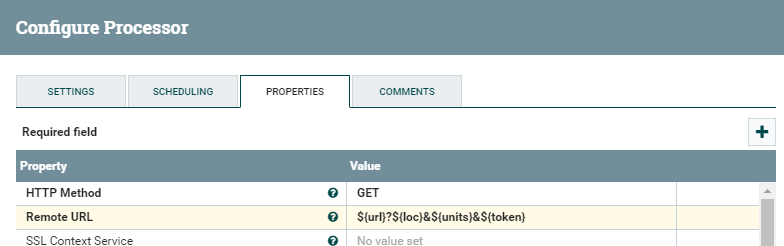
The InvokeHTTP Response relationship is connected to the next processor, PutFile. All the other InvokeHTTP relationships are set to automatically terminate on the Settings tab. See the figure below.

Note that there are actually two Response relationships emanating from the InvokeHTTP processor. As described above, one relationship is connected to the PutFile processor, which I will discuss next, and the other to the EvaluateJSONPath processor, which I will discuss in part 2 of this blog.
The PutFile processor writes the contents of the FlowFile to a file designated in the Nifi attribute ${filename}, which we configured in the UpdateAttribute processor. The PutFile processor also needs to know where to write the file and how to handle filename collisions. This is handled in the Properties for the processor. The PutFile attribute Directory is set to the ${data_path} value originally set in the UpdateAttribute processor, and the Conflict Resolution Strategy is set to replace. See the figure below.

In its current configuration, the dataflow will overwrite the file containing the JSON response from Open Weather Map every time it runs. To avoid this, you can change the filename attribute defined in the UpdateAttribute processor to use the Nifi Expression Language function now() to append the date and time to filename (e.g., filename=weather.${now()}.json) thus making each file unique.
Both PutFile‘s success and failure relationships should be set to automatically terminate.
At this point, you should have a Nifi data flow that downloads weather data every minute and saves it to a JSON file on your hard drive. In my next blog I will discuss how to work with the JSON and get it to a web page for viewing.
The template for this Nifi dataflow, GetcurrentWeather, is here.
 Random Eklektos
2 thoughts on “Apache Nifi – Part 1”